 cat with empty chip bag
Today: dict data type and the dict-count algorithm
This is a little thing every programmer should know, but it's a little funny.
Say I write this little computation
>>> a = 2
>>> b = 3
>>> a ** b
8
Now suppose I write it this way
>>> alice = 2
>>> bob = 3
>>> alice ** bob
8
It's the same computation. The variable names are just labels for the values. I can use "b" or "bob" to refer to the exponent. I can use any word there, so long as I do it consistently through the lines of code.
Or put another way, the functionality of Python does not depend on the words chosen for variables. Like it's standard practice to use the variable i for a 0..n-1 loop, like this:
>>> for i in range(5):
...     print('in loop', i)
...
in loop 0
in loop 1
in loop 2
in loop 3
in loop 4
We do this so consistently with variables like i and pixel, that it's easy to get the impression that those words are required. However, Python does not care what word you use, only that the word is used consistently.
>>> for xyz in range(5):
...     print('in loop', xyz)
...
in loop 0
in loop 1
in loop 2
in loop 3
in loop 4
That said, we try to use meaningful words like s or pixel or x in the code, so the variable name is a useful label of that value in the code.
dict - Hash Table - FastFor more details sees the chapter in the Guide: Dict
Suppose you come home and this is the situation:
cat with empty chip bag
Visualize the check-out at Trader Joes. You hear "beep" "beep" as the barcode for each item is scanned. Each item's barcode holds a UPC code string, like '0061-4207'. The register needs to lookup the current price for each item.
The price data is stored in a dictionary. There is a key for each UPC code. Each key has an associated value stored in the dictionary, and in this case the value is the price for that item. The register scans the UPC off each item, does a dict-lookup of the UPC to retrieve the price, and makes a little beep.

The superpower of the dict is lookup — given a UPC string key, e.g. '0061-4207', lookup the value, i.e. price, stored for that key instantly, in this case 4.99. It makes little difference if the UPC key is the first or last in the dict, the lookup of the UPC key is basically instant.

>>> d = {}             # Start with empty dict {}
>>> d['a'] = 'alpha'   # Set key/value
>>> d['g'] = 'gamma'
>>> d['b'] = 'beta'
>>> # Now we have built the picture above
>>> # Python can input/output a dict using
>>> # the literal { .. } syntax.
>>> d
{'a': 'alpha', 'g': 'gamma', 'b': 'beta'}
>>>
>>> s = d['g']         # Get by key
>>> s
'gamma'
>>> d['b']
'beta'
>>> d['a'] = 'apple'   # Overwrite 'a' key
>>> d['a']
'apple'
>>>
>>> # += modify str value
>>> d['a'] += '!!!'
>>> d['a']
'apple!!!'
>>>
>>> d
{'a': 'apple!!!', 'g': 'gamma', 'b': 'beta'}
>>>
d[key] Error - #1 Dict Issue
>>> # Can initialize dict with literal
>>> d = {'a': 'alpha', 'g': 'gamma', 'b': 'beta'}
>>>
>>> val = d['x']         # Key not in -> Error
Error:KeyError('x',)
>>>
>>> 'a' in d             # "in" key tests
True
>>> 'x' in d
False
>>>
>>> # Pattern: check "in" before ['x']
>>> if 'x' in d:
      val = d['x']
>>>
The get/set/in logic of the dict is always by key. The key of each key/value pair is how it is set and found. The value is actually just stored without being looked at, just so it can be retrieved later. In particular get/set/in logic does not use the value. See the last line below.
>>> d = {'a': 'alpha', 'g': 'gamma', 'b': 'beta'}
>>>
>>> d['a']          # key works
'alpha'
>>> 'g' in d
True
>>>
>>> 'gamma' in d    # value doesn't work
False
>>>
The dictionary is like memory - put something in, later can retrieve it.
Problems below use a "meals" dict to remember what food was eaten under the keys 'breakfast', 'lunch', 'dinner'.
>>> meals = {}
>>> meals['breakfast'] = 'apple'
>>> meals['lunch'] = 'donut'
>>>
>>> # time passes, other lines run
>>>
>>> # what was lunch again?
>>> meals['lunch']
'donut'
>>>
>>> # did I have breakfast and dinner yet?
>>> 'breakfast' in meals
True
>>> 'dinner' in meals
False
>>>
Look at the dict1 "meals" exercises on the experimental server
> dict1 meals exercises
With the "meals" examples, the keys are 'breakfast', 'lunch', 'dinner' and the values are like 'hot dot' and 'bagel'. A key like 'breakfast' may or may not be in the dict, so need to "in" check first. No loops in these.
key in Before dict[key]Often we want to access the value for a particular key:
key = 'lunch'
...

# Want to access d[key] .. could crash
if d[key] == 'something':
But there is always the risk — what if that key is not in the dict? In that case, trying to read d[key] will crash with KeyError. Therefore, the code often has an "in" check about that key before trying to read that key.
# Write it this way
if key in d:
    if d[key] == 'something':
        ...
candy_breakfast(meals): Return True if key 'breakfast' is in the meals dict with value 'candy', and False otherwise.
def donut_breakfast(meals):
    if 'breakfast' in meals:
        if meals['breakfast'] == 'donut':
            return True

    return False
More practice:
bad_start(meals): Return True if there is no 'breakfast' key in meals, or the value for 'breakfast' is 'candy'. Otherwise return False.
> enkale()
enkale(meals): If the key 'dinner' is in the dict with the value 'candy', change the value to 'kale'. Otherwise leave the dict unchanged. Return the dict in all cases.
Demo: work out the code, see key error
Cannot access meals['dinner'] in the case that dinner is not in the dict, so need logic to avoid that case.
def enkale(meals):
    if 'dinner' in meals:
        if meals['dinner'] == 'candy':
            meals['dinner'] = 'kale'
    return meals
Instead of nested-if, could write it with "and" (either way of writing it is fine):
def enkale(meals):
    if 'dinner' in meals and meals['dinner'] == 'candy':
        meals['dinner'] = 'kale'
    return meals
This is the "guard" pattern again — the "in" check guards the meals['dinner'] access, since the and/short-circuit goes left-to-right, and stops on a False.
is_boring(meals): Given a "meals" dict. We'll say the meals dict is boring if lunch and dinner are both present and are the same food. Return True if the meals dict is boring, False otherwise.
Idea: could solve without worrying about the KeyError first. Then put in the needed "in" guard checks.
Example input strings:
  ['a', 'b', 'a', 'c', 'b']

Compute counts:
  {'a': 2, 'b': 2, 'c': 1}
> dict2 Count exercises
Do the following for each s in strs. At the end, counts dict is built.
Go through these strs strs = ['a', 'b', 'a', 'c', 'b']Sketch out counts dict here:
Counts dict ends up as {'a': 2, 'b': 2, 'c': 1}:
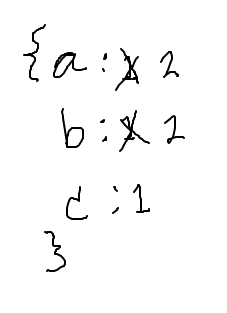
str_count1 demo, canonical dict-count algorithm
def str_count1(strs):
    counts = {}
    for s in strs:
        # s not seen before?
        if s not in counts:
            counts[s] = 1   # first time
        else:
            counts[s] +=1   # every later time
    return counts
def str_count2(strs):
    counts = {}
    for s in strs:
        # fix counts/s if not seen before
        if s not in counts:
            counts[s] = 0
        # Unified: now s is in counts one way or
        # another, so this works for all cases:
        counts[s] += 1
    return counts
Apply the dict-count algorithm to a list of int values, return a counts dict, counting how many times each int value appears in the list.
May get to this one, or students do on their own.
Apply the dict-count algorithm to chars in a string. Build a counts dict of how many times each char, converted to lowercase, appears in a string so 'Coffee' returns {'c': 1, 'o': 1, 'f': 2, 'e': 2}.